HydraulicStreamLog Node
HydraulicStream is a hydraulic erosion operator using a flow-stream formulation and an infinite flow-direction algorithm (D∞). Erosion intensity is driven by flow accumulation, terrain gradient, moisture, and optional bedrock limits. Deposition is simulated using convolution kernels whose radius and scale control smoothing and sediment redistribution.
Category
Erosion/Hydraulic
Inputs
| Name | Type | Description |
|---|---|---|
| input | VirtualArray | Input elevation map to erode. |
| mask | VirtualArray | Mask controlling the local intensity of erosion (expected in [0, 1]). |
Outputs
| Name | Type | Description |
|---|---|---|
| deposition | VirtualArray | Sediment deposition map, normalized in [0, 1]. |
| erosion | VirtualArray | Erosion intensity map, normalized in [0, 1]. |
| flow_map | VirtualArray | Flow accumulation map computed using the infinite flow direction algorithm. |
| output | VirtualArray | Final terrain after erosion, deposition, and post-processing. |
Parameters
| Name | Type | Description |
|---|---|---|
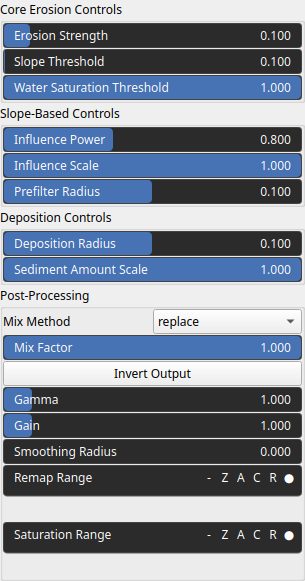
| Erosion Strength | Float | Erosion coefficient controlling the overall strength of erosion during flow simulation. |
| Deposition Radius | Float | Deposition kernel radius. Values > 0 apply smoothing to sediment deposition, simulating lateral diffusion. |
| Sediment Amount Scale | Float | Scaling factor controlling how much sediment is deposited after erosion. |
| Influence Power | Float | Exponent applied to the terrain gradient to modulate erosion intensity. Higher values increase sensitivity to steep slopes. |
| Prefilter Radius | Float | Radius of the smoothing filter applied to the gradient field prior to erosion. Helps stabilize erosion on noisy terrain. |
| Influence Scale | Float | Scaling factor applied to gradient-based erosion intensity, adjusting how strongly slope contributes to erosion. |
| Gain | Float | Mid-centered gain transformation applied to the elevation values. This is a non-linear recurve operator centered around the mid elevation (typically 0.5). Increasing the gain pushes values toward the minimum and maximum elevations, creating flatter low/high regions with a steeper transition around the midpoint. |
| Gamma | Float | Standard gamma correction applied to the elevation values. This is a monotonic power-law remapping that shifts emphasis toward low or high elevations, making the overall shape sharper or bulkier without changing its ordering. |
| Invert Output | Bool | Inverts the output values after processing, flipping low and high values across the midrange. |
| Mix Factor | Float | Mixing factor for blending input and output values. A value of 0 uses only the input, 1 uses only the output, and intermediate values perform a linear interpolation. |
| Mix Method | Enumeration | Method used to combine input and output values. Options include linear interpolation (default), min, max, smooth min, smooth max, add, and subtract. |
| Remap Range | Value range | Linearly remaps the output values to a specified target range (default is [0, 1]). |
| Saturation Range | Value range | Modifies the amplitude of elevations by first clamping them to a given interval and then scaling them so that the restricted interval matches the original input range. This enhances contrast in elevation variations while maintaining overall structure. |
| Smoothing Radius | Float | Defines the radius for post-processing smoothing, determining the size of the neighborhood used to average local values and reduce high-frequency detail. A radius of 0 disables smoothing. |
| Water Saturation Threshold | Float | Flow accumulation saturation threshold. Controls clipping of water flux to avoid runaway erosion. |
| Slope Threshold | Float | Reference talus angle. Lower values produce thinner flow streams by increasing directional concentration. |
Example
No example yet
No example available for this node.