Multisteps Node
Generates a multi-step height profile along a rotated axis, optionally modulated by control and noise fields.
Category
Primitive/Geological
Inputs
| Name | Type | Description |
|---|---|---|
| control | VirtualArray | Optional control field used to modulate step height or shape along the axis. |
| dx | VirtualArray | Displacement with respect to the domain size (x-direction). |
| dy | VirtualArray | Displacement with respect to the domain size (y-direction). |
| envelope | VirtualArray | Heightmap used as a post-process amplitude multiplier for the generated noise. |
Outputs
| Name | Type | Description |
|---|---|---|
| output | VirtualArray | Resulting heightmap containing the generated multi-step profile after optional modulation and post-processing. |
Parameters
| Name | Type | Description |
|---|---|---|
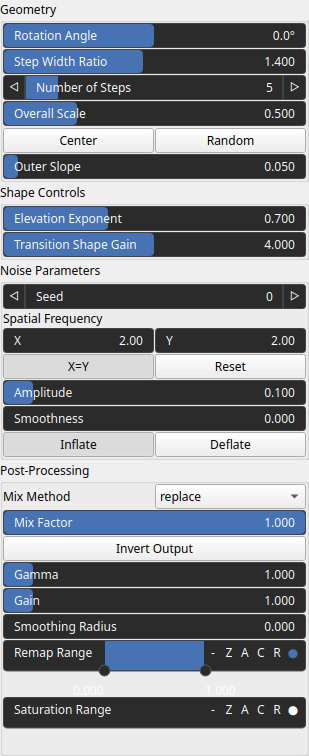
| Rotation Angle | Float | Rotation angle (in degrees) that orients the step axis within the domain. |
| Center | Vec2Float | 2D center point of the rotated step axis, expressed in normalized domain coordinates. |
| Elevation Exponent | Float | Exponent controlling the vertical shaping of each step. Values greater than 1 sharpen heights, while values below 1 soften them. |
| Spatial Frequency | Wavenumber | Base spatial frequencies in the X and Y directions. The frequencies are defined with respect to the entire domain: for example, kw = 2 produces two full oscillations across the domain width (and similarly for the Y direction). |
| Amplitude | Float | Amplitude of the noise modulation applied along the step axis. Higher values increase deformation intensity. |
| Bool | Controls how noise affects the step profile. ‘Inflate’ pushes elevations outward, while ‘Deflate’ pulls them inward. | |
| Smoothness | Float | Smoothness of the noise field. Lower values produce rougher, high-frequency variations; higher values smooth the noise. |
| Number of Steps | Integer | Total number of geometric steps composing the profile. |
| Outer Slope | Float | Slope of the function outside the normalized [0, 1] axis range, defining how values behave beyond the step region. |
| Gain | Float | Mid-centered gain transformation applied to the elevation values. This is a non-linear recurve operator centered around the mid elevation (typically 0.5). Increasing the gain pushes values toward the minimum and maximum elevations, creating flatter low/high regions with a steeper transition around the midpoint. |
| Gamma | Float | Standard gamma correction applied to the elevation values. This is a monotonic power-law remapping that shifts emphasis toward low or high elevations, making the overall shape sharper or bulkier without changing its ordering. |
| Invert Output | Bool | Inverts the output values after processing, flipping low and high values across the midrange. |
| Mix Factor | Float | Mixing factor for blending input and output values. A value of 0 uses only the input, 1 uses only the output, and intermediate values perform a linear interpolation. |
| Mix Method | Enumeration | Method used to combine input and output values. Options include linear interpolation (default), min, max, smooth min, smooth max, add, and subtract. |
| Remap Range | Value range | Linearly remaps the output values to a specified target range (default is [0, 1]). |
| Saturation Range | Value range | Modifies the amplitude of elevations by first clamping them to a given interval and then scaling them so that the restricted interval matches the original input range. This enhances contrast in elevation variations while maintaining overall structure. |
| Smoothing Radius | Float | Defines the radius for post-processing smoothing, determining the size of the neighborhood used to average local values and reduce high-frequency detail. A radius of 0 disables smoothing. |
| Step Width Ratio | Float | Geometric ratio between successive step widths. Values above 1 create increasingly wide steps. |
| Overall Scale | Float | Overall scale of the step axis, determining the spatial expansion of the stepped pattern. |
| Seed | Random seed number | Random seed number. The random seed is an offset to the randomized process. A different seed will produce a new result. |
| Transition Shape Gain | Float | Gain controlling the sharpness of transitions within each step. Higher values produce steeper intra-step transitions. |
Example
No example yet
No example available for this node.