Masks & Selectors
The idea
Often you want an operation to apply to part of the terrain — roughen only the
steep faces, tint only the low ground, erode only the valleys. A mask expresses
that: it is itself a heightmap, used as a per-cell weight. Typically 1 means "fully
apply here", 0 means "leave untouched", and values in between blend.
A selector is a node that builds a mask by looking at a property of the
terrain — slope, elevation, curvature, distance — and emitting high values where
the property matches. Hesiod's selector nodes are the Select… family
(SelectSlope, SelectGt, SelectInterval, SelectRivers, SelectValley, …),
and masks can be combined with CombineMask.
How Hesiod handles it
A selector takes a heightmap on its input port and returns a heightmap on its
output port, which you feed into another node's mask input. Because a mask is just
a heightmap, anything that makes a heightmap can be a mask, and masks compose.
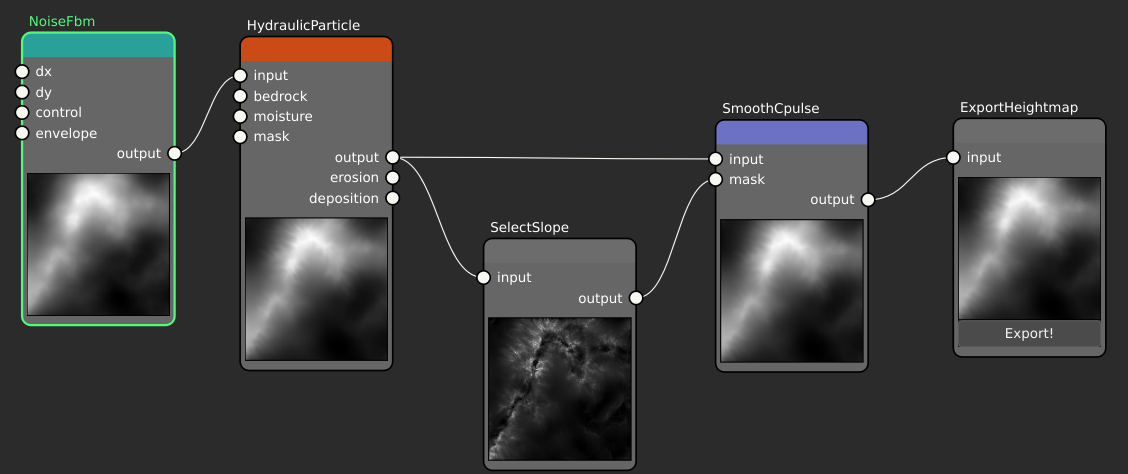
Here the eroded terrain feeds SelectSlope, whose thumbnail shows the resulting
mask — bright on the steep faces, dark on the flats. That mask is wired into the
mask input of a SmoothCpulse filter, while the same terrain also feeds the
filter's input, so the filter only acts where the mask is high.
CombineMask takes two heightmaps and merges them — intersection (per-cell minimum),
union (per-cell maximum), or exclusion (the difference) — so you can build up
"steep and high" or "valley or river" regions from simpler selectors.
See also
- Node reference → selector nodes — the full
Select…family. - Heightmaps & virtual arrays — a mask is a heightmap.